The relationship starts long before the first gift.

Kodeca is a CRM built for fundraising and external relations at universities, research institutes and foundations. The full history stays with the person and the organisation — nothing is overwritten when a colleague moves on.

Hosted and supported inside the EU only. Swedish and English interface, per user.

One relationship over time

  • Contact
  • Event
  • Gift
  1. 2011Alumna — Graduated, engineering programme
  2. 2016Event — Attended a research seminar
  3. 2019First gift — Purpose: cancer research
  4. 2022Stewardship plan — Annual report back to the donor
  5. 2025Multi-year commitment — Co-funding a research position
An example of how a relationship builds up over time in Kodeca. Illustrative example, not real personal data.

The starting point

The history exists. It is just scattered.

A spreadsheet on one officer’s drive. Email threads in Outlook. Notes from a meeting still sitting with a colleague who has changed roles. An attendee list from an anniversary event in a file nobody can find.

When a gift conversation is picked up again, the first hour goes into working out what has already been said — and the donor risks being asked the same question twice.

Scattered

  • A spreadsheet per department
  • Email in individual inboxes
  • Meeting notes kept locally
  • Attendee lists in loose files
  • Agreements in a binder

Coherent in Kodeca

  • One record per person and organisation
  • Gifts linked to purpose and party
  • Contact history that stays put
  • Events, registrations and attendance
  • Documents and agreements on the right party

Kodeca brings it together into one coherent relationship history. Contacts, gifts, events, mailings and commitments stay with the person, the organisation and the department — even when staff change.

Features

Built for donor work, not adapted to it afterwards.

A general sales tool describes customers and deals. Fundraising is about people, purposes and trust held over many years. Kodeca is modelled on that.

Relationships

A 360° view of people and organisations

See the whole picture of a contact: individual or organisation, family, colleagues, former employers and the networks they belong to. Relationships and contact history accumulate over time and are never overwritten.

  • Individuals, organisations, families and households
  • Colleagues, former employers and networks
  • Complete contact history, preserved
  • Documents and agreements on people, units and organisations

Gifts and pipeline

Gifts, grants and donations in their real context

A gift can involve several parties — the donor, the employer who matches it, the foundation that channels it. Every gift is categorised by income type and purpose area, such as cancer, diabetes or cardiovascular research.

  • Gifts linked to several parties at once
  • Categorised by income type and purpose area
  • Donor pipeline with stages and an owner
  • Forecast across open conversations

Stewardship

Promises to report back that are actually kept

Set up a stewardship plan per donor or purpose, holding the commitments that were made. Kodeca reminds the responsible officer automatically when it is time to come back.

  • Stewardship plans per donor or purpose
  • Automatic reminders to the person responsible
  • Commitments visible in the donor’s history

Events

From invitation to check-in

Handle invitations, registrations, accompanying guests, dietary preferences and cancellations in one place. Check-in on the day is done with a QR code, and attendance lands straight in the guest’s history.

  • Invitation, registration and cancellation
  • Accompanying guests and dietary preferences
  • QR-code check-in
  • Attendance linked to the contact’s history

Communication

Email and SMS with consent under control

Send email and SMS, and follow up on opens and clicks. Consent and communication preferences are held per contact, so GDPR obligations can be demonstrated rather than merely asserted.

  • Email and SMS campaigns
  • Open and click tracking
  • Consent and preferences per contact
  • Opt-outs that apply everywhere

Research connection

Who funds which research project

Researcher profiles connect people, departments and projects. From there you can see which donors fund which research — and which researchers are short of funding for the next period.

  • Researcher profiles with department and field
  • Research projects with their funders
  • A view of who funds what
  • Purpose areas linked to projects

Reports and dashboards

Numbers you can hand on

Track fundraising KPIs and build personal dashboards per role. Reports export to Excel or PDF when the figures are needed for management, the board or the annual report.

  • KPIs and reports for fundraising
  • Personal dashboards per user
  • Export to Excel and PDF

Also included

Permissions in the interface
Role-based access administered directly in the user interface — no config file, no consultant.
Swedish or English per user
Each user picks their own interface language. Same database, same records.
Desktop, tablet and mobile
The interface works on the screens people actually use — including at the door during check-in.
Documents and agreements
Attach documents and agreements to people, units and organisations, where they belong.

From the product

What it actually looks like.

Screenshots from a Kodeca installation with demo data. No real personal data, no invented figures — this is the product as it stands today.

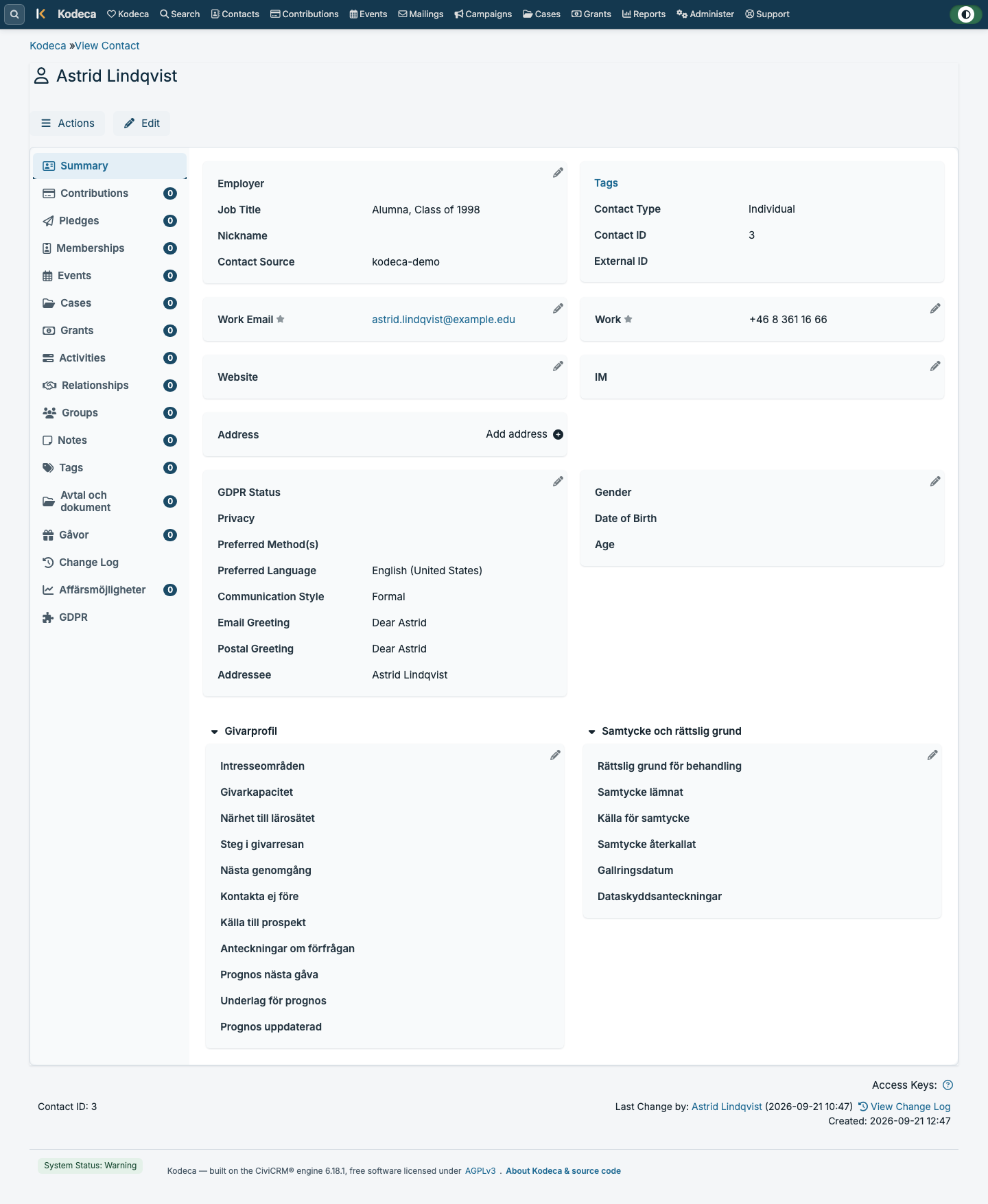
The contact view

Contact details, donor profile and legal basis on one page, with gifts, pledges, events, relationships, agreements and the change log one click away — all tied to the same person.

The contact view in Kodeca: a summary for an alumna with panels for employer, contact details, GDPR status, donor profile and consent, and a menu for gifts, pledges, events, relationships, agreements and the change log.
Screenshot from Kodeca with demo data — no real personal data. View at full size

Donor pipeline with forecast

The pipeline board shows the number of conversations and the total and weighted amount at each stage. Beneath it sit a weighted-value chart and the full list: prospect, opportunity, expected amount, probability, weighted value and expected close. This view is shown here in Swedish.

The Prospect pipeline view in Kodeca with a Swedish interface: a pipeline board with one card per stage — identification, qualification, relationship building, solicitation, negotiation and the stages that follow — each card showing the number of conversations and the total and weighted amount in Swedish kronor.
Screenshot from Kodeca with demo data — no real personal data. View at full size

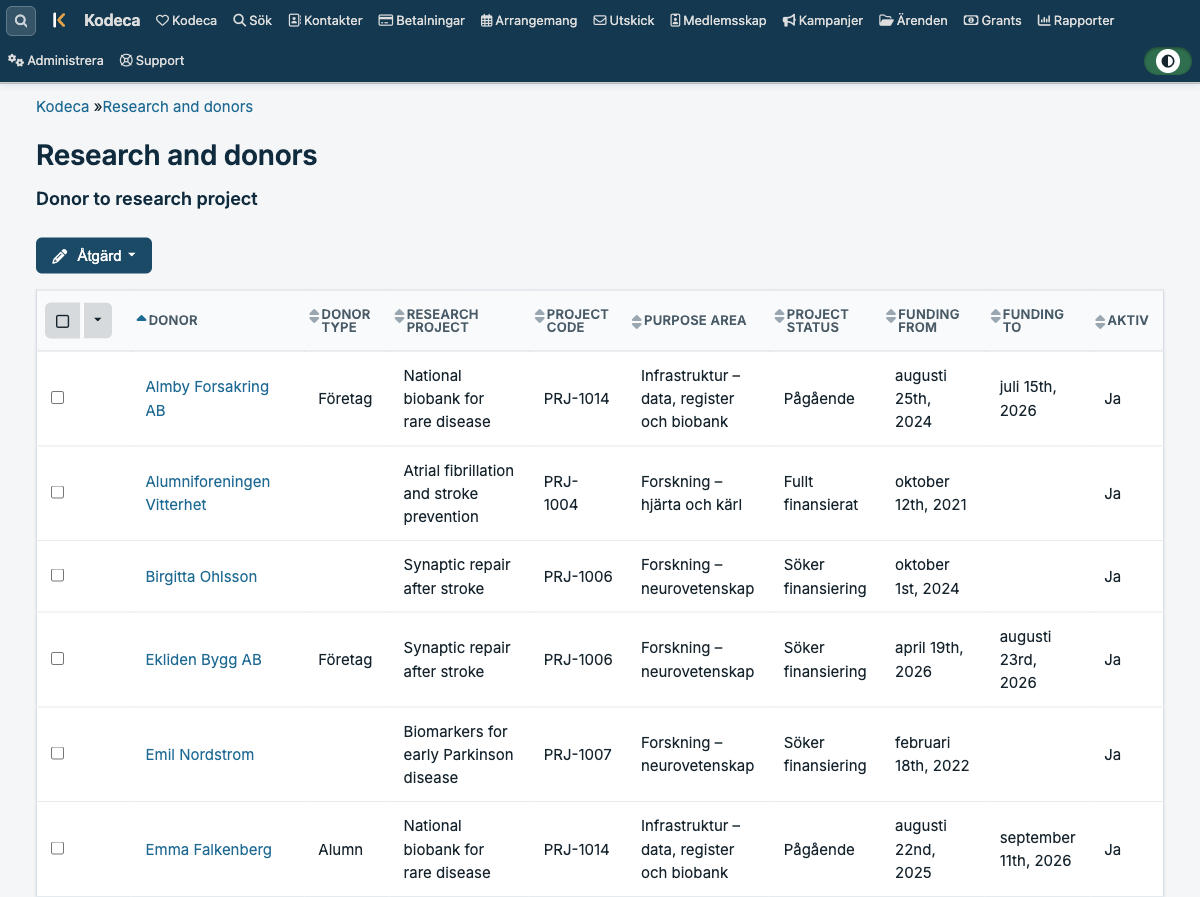
Research and donors

The link between donors and research projects: donor type, project code, purpose area, project status and funding period — the basis for answering who funds what.

The Research and donors view in Kodeca: a table linking donors to research projects with columns for donor type, research project, project code, purpose area, project status and funding period.
Screenshot from Kodeca with demo data — no real personal data. View at full size

The contact view is shown in English and the pipeline in Swedish — one installation, one database. Each user picks their own interface language.

Integrations

Connects to what the institution already runs.

Kodeca does not replace email and calendar — it connects to them, so the contact history is complete without anyone keying it in twice.

Microsoft 365 and Outlook
Email and calendar tied into the contact’s history.
Microsoft Teams
Integration with Teams for collaboration around donors and cases.
Web forms
Registrations and enquiries from your website land on the right contact.
SSO — SAML2 and OpenID Connect
Sign-in through the institution’s own directory, for example Entra ID.
Open REST API
A documented API for your own integrations with finance systems and other registers.

Security and GDPR

Personal data that stays inside the EU.

A donor register holds some of the most sensitive data an institution handles: finances, health-related purposes, private relationships. That is why hosting and support are wholly inside the EU, on EU-owned infrastructure.

Hosting and support in the EU

Kodeca is hosted and supported exclusively within the EU, on EU-owned infrastructure. No personal data leaves the union.

Encryption

Encrypted transfer using TLS 1.2 or later, and encryption of data at rest.

Backups

Daily full and incremental backups with restore to a chosen point in time.

Audit logging

Logging of who did what and when, for follow-up and audit.

Multi-factor authentication

MFA for sign-in, and SSO against the institution’s own identity management.

Separate test environment

A separate test environment is included, for training and for trying changes before they go live.

Consent and communication preferences are held per contact in the system, and opt-outs apply across every mailing.

Open foundation

Built on an open engine, and we name it.

Kodeca is built on CiviCRM, an established open-source engine for membership and donor management, licensed under AGPL-3.0. On top of it sits Kodeca’s data model for fundraising: donor pipeline, purpose areas, researcher profiles and stewardship.

We spell this out because it is an argument, not a disclaimer. An open foundation means the code can be audited, the data can be exported in full, and the institution is not locked in to a single supplier.

No lock-in
The data model is open and documented. Change supplier and your data comes with you.
Full export
The entire database can be exported — not just the views a supplier chooses to offer.
Auditable code
The engine’s source code is public and reviewed by an international developer community.

CiviCRM is a trademark of CiviCRM LLC. Kodeca is not affiliated with or endorsed by CiviCRM LLC.

Implementation and support

An implementation that is project-led, not handed over.

Most institutions have already been through a system migration that took longer than planned. Kodeca comes with a project-led implementation where the supplier owns getting you live.

  1. Kick-off and review

    A joint review of ways of working, purpose areas, roles and the registers you keep today.

  2. Configuration

    Pipeline stages, purpose areas, permissions and dashboards set up around your organisation.

  3. Data migration

    Existing donor registers, spreadsheets and contact lists are migrated, cleaned and quality-checked together with you.

  4. Training in Swedish

    Training for officers, administrators and management, in Swedish and in your own test environment.

  5. Go-live and ongoing support

    Support in Swedish and English, weekdays 08:00–17:00 CET, through a named point of contact.

Support

  • Weekdays 08:00–17:00 CET
  • Swedish and English
  • Separate test environment included

FAQ

Questions that tend to come up in procurement.

Where is our personal data stored?

Inside the EU. Kodeca is hosted and supported exclusively within the EU, on EU-owned infrastructure. Neither hosting, support nor backups leave the union.

What does Kodeca cost?

Pricing depends on the number of users and the scope of data migration and training. We quote after reviewing your needs — book a demo and we will take it from there.

Can we get our data out if we change systems?

Yes. Kodeca is built on an open data model and the entire database can be exported. Reports and selections can also be exported to Excel and PDF at any time.

Do you support sign-in with our own accounts?

Yes. Kodeca supports SSO through SAML2 and OpenID Connect, for example against Entra ID, as well as multi-factor authentication.

Can our staff work in Swedish?

Yes. The interface is available in Swedish and English, and each user chooses their own language. Training and support are provided in Swedish.

Is a test environment included?

Yes, a separate test environment is included. It is used for training and for trying out configuration changes before they go live.

How is consent for mailings handled?

Consent and communication preferences sit on the contact and govern which mailings may go out. Opt-outs apply across every mailing, and the history is retained for follow-up.

Does Kodeca work on mobile?

Yes. The interface works on desktop, tablet and mobile — including QR check-in at events.

Book a demo

See Kodeca with your own questions in front of you.

A demo takes around 45 minutes and starts from how you work today. Tell us in advance what you want to see and we will build it around that.

For example donor pipeline, events, or migrating from an existing register.

Fields marked with * are required. The button opens your email client with the details filled in. We use them only to answer your request.

Or get in touch directly

Email
hello@kodeca.com
Supplier
Sixty Four OÜ, Estonia